
Mild White 宠物健康开放平台开发者文档
欢迎使用 Mild White 宠物健康开放平台,您可以通过本文档快速接入平台,获取宠物心率、呼吸、在垫状态等健康数据。
平台介绍
Mild White 宠物健康开放平台面向第三方开发者提供标准化的宠物健康数据接口,支持设备绑定、历史数据查询、实时数据推送等能力,帮助您快速构建宠物健康相关应用。
平台能力
- 🔐 安全鉴权:基于 OAuth2.0 客户端模式,保障接口调用安全
- 📱 多端 SDK:提供 Android、iOS、HarmonyOS、Flutter、UniAppX、Python 等多端 SDK
- ⚡ 实时推送:基于 MQTT 协议毫秒级推送宠物健康实时数据
- 📊 历史数据:支持查询设备上报的历史健康数据,分页返回
- 🔒 权限隔离:严格的应用数据隔离,每个应用只能访问自己绑定的设备数据
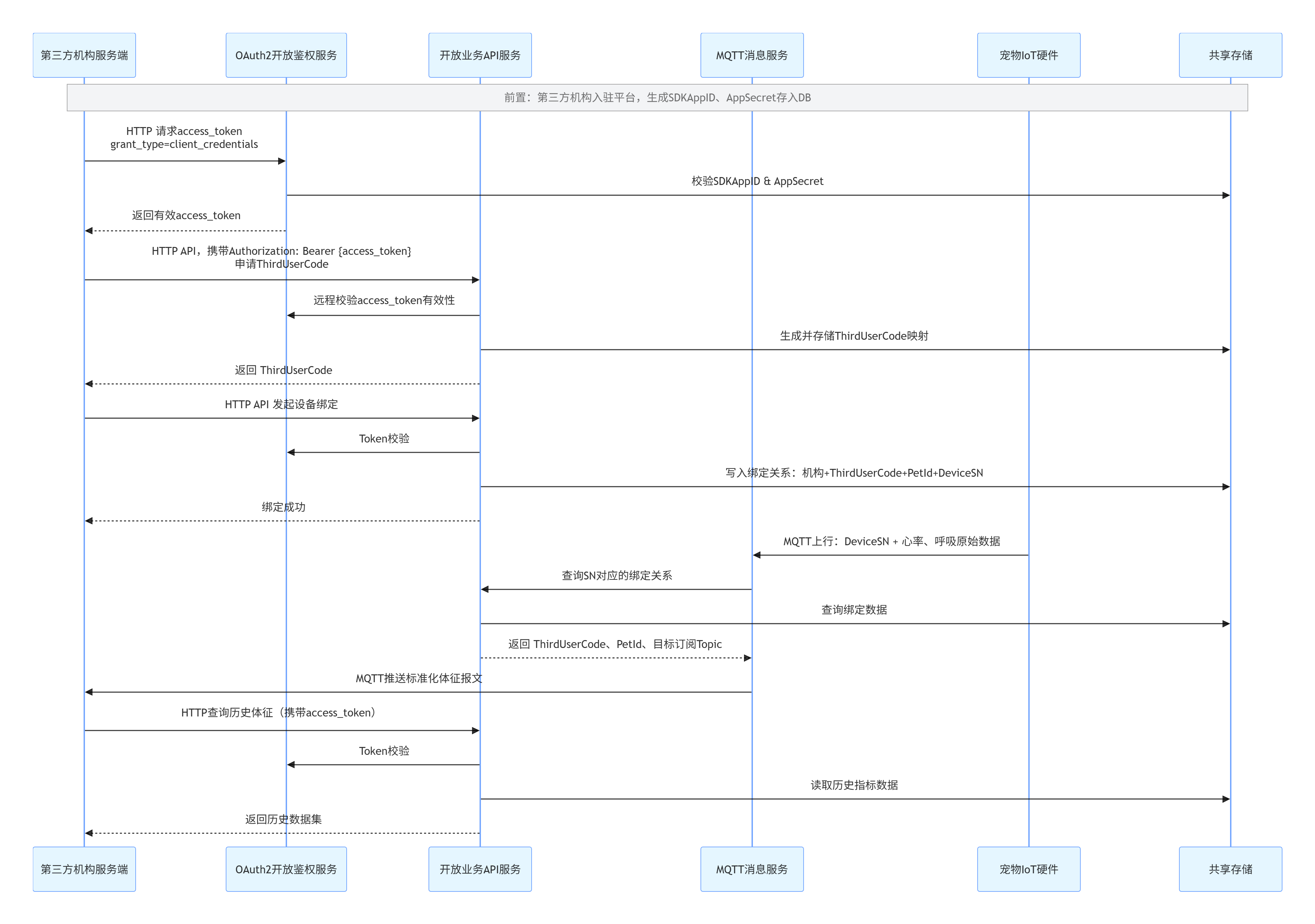
接入流程
- 注册开放平台开发者账号,完成企业资质认证
- 审核通过后获取 SDKAppID 和 AppSecret 凭证
- 调用 OAuth2.0 接口获取 access_token
- 调用设备绑定接口,将设备 SN 与第三方用户/宠物绑定
- 通过 HTTP 接口查询历史数据,或通过 MQTT 订阅实时数据
申请开发者凭证
访问 Mild White 开放平台,注册账号并提交企业资质申请,审核通过后即可获得专属的 SDKAppID 和 AppSecret,作为接口调用的身份凭证。
请妥善保管您的 AppSecret,不要在客户端代码中暴露,避免泄露。
OAuth2.0 认证
平台采用 OAuth2.0 客户端模式(Client Credentials)进行接口鉴权,所有开放 API 调用都需要携带 access_token。
认证流程
- 使用 SDKAppID 和 AppSecret 调用 token 接口获取 access_token
- access_token 有效期为 2 小时,过期后需要重新获取
- 调用业务接口时,在请求头中携带
Authorization: Bearer {access_token}
获取 access_token
接口地址:GET/POST https://open.aidbai.com/oauth/token
请求参数:
| 参数名 | 类型 | 必填 | 说明 |
|---|---|---|---|
| grant_type | string | 是 | 固定值:client_credentials |
| sdk_app_id | string | 是 | 平台分配的应用 ID |
| app_secret | string | 是 | 平台分配的应用密钥 |
返回示例:
{
  "code": 1,
  "msg": "成功",
  "data": {
    "access_token": "eyJhbGciOiJIUzI1NiIsInR5cCI6IkpXVCJ9...",
    "expires_in": 7200
  }
}
API 参考
所有业务接口请求头必须携带
Authorization: Bearer {access_token},否则会返回 401 未授权错误。
分配第三方用户标识
为第三方系统用户分配平台唯一的 ThirdUserCode,用于设备绑定和数据关联。
接口地址:POST https://open.aidbai.com/open/api/allocateThirdUserCode
返回示例:
{
  "code": 1,
  "msg": "成功",
  "data": {
    "third_user_code": "TU_61a8f9d7e4b0c2a3f1e2d3c4"
  }
}
设备绑定
将设备 SN 与第三方用户、宠物进行绑定,绑定后该设备的数据会推送给当前应用。
接口地址:POST https://open.aidbai.com/open/api/bindDevice
请求参数(JSON):
| 参数名 | 类型 | 必填 | 说明 |
|---|---|---|---|
| device_sn | string | 是 | 设备 SN 序列号 |
| third_user_code | string | 是 | 平台分配的第三方用户标识 |
| pet_id | string | 否 | 第三方系统中的宠物 ID |
返回示例:
{
  "code": 1,
  "msg": "成功",
  "data": null
}
设备解绑
解除设备与第三方用户的绑定关系,解绑后不再推送该设备数据。
接口地址:POST https://open.aidbai.com/open/api/unbindDevice
请求参数(JSON):
| 参数名 | 类型 | 必填 | 说明 |
|---|---|---|---|
| device_sn | string | 是 | 设备 SN 序列号 |
查询设备历史数据
分页查询设备上报的历史健康数据。
接口地址:GET https://open.aidbai.com/open/api/history
请求参数:
| 参数名 | 类型 | 必填 | 说明 |
|---|---|---|---|
| device_sn | string | 是 | 设备 SN 序列号 |
| start_time | string | 否 | 开始时间,格式:yyyy-MM-dd HH:mm:ss |
| end_time | string | 否 | 结束时间,格式:yyyy-MM-dd HH:mm:ss |
| page | int | 否 | 页码,默认 1 |
| page_size | int | 否 | 每页数量,默认 20,最大 100 |
返回示例:
{
  "code": 1,
  "msg": "成功",
  "data": {
    "total": 100,
    "page": 1,
    "page_size": 20,
    "list": [
      {
        "time": "2026-07-24 20:00:00",
        "heart_rate": 85,
        "breath_rate": 22,
        "battery": 95,
        "sleep_status": 1,
        "in_bed": true
      }
    ]
  }
}
查询设备归属
查询设备当前的绑定归属信息。
接口地址:GET https://open.aidbai.com/open/api/getDeviceOwner
请求参数:
| 参数名 | 类型 | 必填 | 说明 |
|---|---|---|---|
| device_sn | string | 是 | 设备 SN 序列号 |
MQTT 实时数据接入
平台基于 MQTT 协议提供实时数据推送服务,设备上报的健康数据会实时推送给订阅的第三方应用。
连接信息
| 项 | 值 | 说明 |
|---|---|---|
| Broker 地址 | mqtt.aidbai.com | 公网访问地址 |
| TCP 端口 | 1883 | 标准 MQTT 端口,非加密 |
| MQTTS 端口 | 8883 | SSL 加密端口(可选) |
| 用户名 | {YOUR_SDK_APP_ID} | 平台分配的 SDKAppID |
| 密码 | {YOUR_APP_SECRET} | 平台分配的 AppSecret |
| 订阅主题 | open/app/{SDKAppID}/realtime | 仅可订阅自己 SDKAppID 的主题 |
| QoS 等级 | 1 | 推荐使用 QoS1 保证消息至少到达一次 |
订阅规则
- 权限隔离:每个应用仅可订阅
open/app/{自己的SDKAppID}/realtime主题,跨应用订阅会被系统自动拒绝 - 禁止通配符:不允许使用
#、+等通配符订阅,会直接被拒绝 - 禁止发布:第三方客户端仅允许订阅消息,不允许向任何主题发布消息
- 连接限制:每个 SDKAppID 默认最多支持 10 个长连接,更多连接请联系客服
消息格式
所有实时消息采用 JSON 格式(UTF-8 编码),字段说明如下:
| 字段名 | 类型 | 说明 |
|---|---|---|
| third_user_code | string | 第三方用户标识 |
| pet_id | string | 第三方宠物 ID |
| device_sn | string | 设备 SN 序列号 |
| heart_rate | int | 心率(次/分钟),无有效数据时返回 0 |
| breath_rate | int | 呼吸频率(次/分钟),无有效数据时返回 0 |
| in_bed | boolean | 是否在垫上 |
| activity | int | 活动指数 0-100,预留字段 |
| heart_rate_probability | int | 心率置信度 0-100 |
| breath_rate_probability | int | 呼吸置信度 0-100 |
| timestamp | long | 13 位毫秒时间戳(北京时间 UTC+8) |
在垫正常数据示例:
{
  "third_user_code": "TU_61a8f9d7e4b0c2a3f1e2d3c4",
  "pet_id": "PET001",
  "device_sn": "SN202607240001",
  "heart_rate": 85,
  "breath_rate": 22,
  "in_bed": true,
  "activity": 0,
  "heart_rate_probability": 92,
  "breath_rate_probability": 88,
  "timestamp": 1721723456789
}
离垫无数据示例:
{
  "third_user_code": "TU_61a8f9d7e4b0c2a3f1e2d3c4",
  "pet_id": "PET001",
  "device_sn": "SN202607240001",
  "heart_rate": 0,
  "breath_rate": 0,
  "in_bed": false,
  "activity": 0,
  "heart_rate_probability": 0,
  "breath_rate_probability": 0,
  "timestamp": 1721723456789
}
接入示例
Python 示例(paho-mqtt):
import paho.mqtt.client as mqtt
import json

BROKER = "mqtt.aidbai.com"
PORT = 1883
SDK_APP_ID = "YOUR_SDK_APP_ID"
APP_SECRET = "YOUR_APP_SECRET"
TOPIC = f"open/app/{SDK_APP_ID}/realtime"

def on_connect(client, userdata, flags, rc):
    print(f"Connected successfully, result code: {rc}")
    client.subscribe(TOPIC, qos=1)

def on_message(client, userdata, msg):
    payload = json.loads(msg.payload.decode('utf-8'))
    print(f"Message received: {payload}")

client = mqtt.Client(client_id=f"python_server_{SDK_APP_ID}", clean_session=False)
client.username_pw_set(SDK_APP_ID, APP_SECRET)
client.on_connect = on_connect
client.on_message = on_message
client.connect(BROKER, PORT, 60)
client.loop_forever()
SDK 下载
我们提供多端 SDK,帮助您快速接入平台:
错误码说明
所有接口返回统一的 JSON 格式,code=1 表示成功,其他值表示失败:
| 错误码 | 说明 |
|---|---|
1 | 请求成功 |
401 | 未授权/未登录/access_token 无效或过期/缺少认证请求头 |
40000 | 请求方法不支持 |
40001 | SDKAppID 不存在或 AppSecret 错误 |
40002 | 应用已被禁用 |
40003 | 参数错误(缺少必填参数、格式错误、类型错误、JSON 解析失败) |
40010 | 设备已被其他账号绑定 |
40012 | 设备未绑定 |
40013 | 无权操作该设备/设备不属于当前应用 |
40014 | 设备不存在,请确认设备 SN 正确 |
42901 | 请求过于频繁,请稍后重试 |
50000 | 操作失败/服务内部异常 |
常见问题
1. HTTP 接口调用返回 401 错误?
- 检查 access_token 是否正确,是否过期(有效期 2 小时)
- 检查 Authorization 请求头格式是否为
Bearer {access_token},注意 Bearer 后面有空格 - 检查 access_token 是否是当前 SDKAppID 对应的 token
2. MQTT 连接失败?
- 检查 Broker 地址和端口是否正确:mqtt.aidbai.com:1883
- 检查用户名和密码是否正确,用户名为 SDKAppID,密码为 AppSecret
- 检查服务器网络是否能访问 1883 端口,防火墙是否开放
- 检查连接数是否超过限制,默认每个应用最多 10 个连接
3. MQTT 订阅失败?
- 检查订阅主题是否正确,格式必须为
open/app/{你的SDKAppID}/realtime - 不支持通配符订阅,不允许订阅其他应用的主题
- 第三方客户端不允许发布消息,仅支持订阅
4. 收不到实时数据?
- 检查设备是否已经绑定到当前应用
- 检查设备是否在线,是否正常上报数据
- 检查 MQTT 连接是否正常,订阅是否成功
- 检查 QoS 等级是否设置为 1,避免消息丢失
© 2026 Mild White 暖白时光 · 广州艾极科技有限公司
技术支持:support@aidbai.com
Mild White Pet Health Open Platform Developer Documentation
Welcome to Mild White Pet Health Open Platform. You can quickly access the platform through this document to obtain pet health data such as heart rate, respiration, and in-bed status.
Platform Introduction
Mild White Pet Health Open Platform provides standardized pet health data interfaces for third-party developers, supporting device binding, historical data query, real-time data push and other capabilities to help you quickly build pet health related applications.
Platform Capabilities
- 🔐 Secure Authentication: Based on OAuth2.0 client mode to ensure interface call security
- 📱 Multi-platform SDK: Provides SDKs for Android, iOS, HarmonyOS, Flutter, UniAppX, Python and more
- ⚡ Real-time Push: Millisecond-level push of pet health real-time data based on MQTT protocol
- 📊 Historical Data: Support querying historical health data reported by devices, returned in pages
- 🔒 Permission Isolation: Strict application data isolation, each application can only access its own bound device data
Integration Process
- Register an open platform developer account and complete enterprise qualification certification
- Obtain SDKAppID and AppSecret credentials after approval
- Call the OAuth2.0 interface to obtain access_token
- Call the device binding interface to bind the device SN with third-party users/pets
- Query historical data through HTTP interface, or subscribe to real-time data through MQTT
Apply for Developer Credentials
Visit Mild White Open Platform, register an account and submit an enterprise qualification application. After approval, you will get your exclusive SDKAppID and AppSecret as identity credentials for interface calls.
Please keep your AppSecret properly and do not expose it in client code to avoid leakage.
OAuth2.0 Authentication
The platform uses OAuth2.0 Client Credentials mode for interface authentication. All open API calls need to carry access_token.
Authentication Process
- Use SDKAppID and AppSecret to call the token interface to obtain access_token
- access_token is valid for 2 hours, need to re-obtain after expiration
- When calling business interfaces, carry
Authorization: Bearer {access_token}in the request header
Get access_token
Endpoint: GET/POST https://open.aidbai.com/oauth/token
Request Parameters:
| Parameter | Type | Required | Description |
|---|---|---|---|
| grant_type | string | Yes | Fixed value: client_credentials |
| sdk_app_id | string | Yes | Application ID assigned by the platform |
| app_secret | string | Yes | Application secret assigned by the platform |
Response Example:
{
  "code": 1,
  "msg": "success",
  "data": {
    "access_token": "eyJhbGciOiJIUzI1NiIsInR5cCI6IkpXVCJ9...",
    "expires_in": 7200
  }
}
API Reference
All business interface request headers must carry
Authorization: Bearer {access_token}, otherwise 401 unauthorized error will be returned.
Allocate Third-party User Code
Allocate a platform-unique ThirdUserCode for third-party system users for device binding and data association.
Endpoint: POST https://open.aidbai.com/open/api/allocateThirdUserCode
Response Example:
{
  "code": 1,
  "msg": "success",
  "data": {
    "third_user_code": "TU_61a8f9d7e4b0c2a3f1e2d3c4"
  }
}
Device Binding
Bind the device SN with third-party users and pets. After binding, the device data will be pushed to the current application.
Endpoint: POST https://open.aidbai.com/open/api/bindDevice
Request Parameters (JSON):
| Parameter | Type | Required | Description |
|---|---|---|---|
| device_sn | string | Yes | Device SN serial number |
| third_user_code | string | Yes | Third-party user identifier assigned by the platform |
| pet_id | string | No | Pet ID in third-party system |
Device Unbinding
Unbind the device from the third-party user, data push will stop after unbinding.
Endpoint: POST https://open.aidbai.com/open/api/unbindDevice
Request Parameters (JSON):
| Parameter | Type | Required | Description |
|---|---|---|---|
| device_sn | string | Yes | Device SN serial number |
Query Device Historical Data
Query historical health data reported by devices in pages.
Endpoint: GET https://open.aidbai.com/open/api/history
Request Parameters:
| Parameter | Type | Required | Description |
|---|---|---|---|
| device_sn | string | Yes | Device SN serial number |
| start_time | string | No | Start time, format: yyyy-MM-dd HH:mm:ss |
| end_time | string | No | End time, format: yyyy-MM-dd HH:mm:ss |
| page | int | No | Page number, default 1 |
| page_size | int | No | Page size, default 20, maximum 100 |
Query Device Ownership
Query the current binding ownership information of the device.
Endpoint: GET https://open.aidbai.com/open/api/getDeviceOwner
Request Parameters:
| Parameter | Type | Required | Description |
|---|---|---|---|
| device_sn | string | Yes | Device SN serial number |
MQTT Real-time Data Access
The platform provides real-time data push service based on MQTT protocol. Health data reported by devices will be pushed to subscribed third-party applications in real time.
Connection Information
| Item | Value | Description |
|---|---|---|
| Broker Address | mqtt.aidbai.com | Public network access address |
| TCP Port | 1883 | Standard MQTT port, unencrypted |
| MQTTS Port | 8883 | SSL encrypted port (optional) |
| Username | {YOUR_SDK_APP_ID} | SDKAppID assigned by the platform |
| Password | {YOUR_APP_SECRET} | AppSecret assigned by the platform |
| Subscribe Topic | open/app/{SDKAppID}/realtime | You can only subscribe to topics with your own SDKAppID |
| QoS Level | 1 | QoS1 is recommended to ensure messages arrive at least once |
Subscription Rules
- Permission Isolation: Each application can only subscribe to
open/app/{your SDKAppID}/realtimetopic, cross-application subscriptions are automatically rejected - Wildcards Prohibited: Subscriptions using wildcards such as
#and+are not allowed and will be directly rejected - Publishing Prohibited: Third-party clients are only allowed to subscribe to messages, and are not allowed to publish messages to any topic
- Connection Limit: Each SDKAppID supports up to 10 long connections by default, contact customer service for more connections
Message Format
All real-time messages are in JSON format (UTF-8 encoding), field descriptions are as follows:
| Field | Type | Description |
|---|---|---|
| third_user_code | string | Third-party user identifier |
| pet_id | string | Third-party pet ID |
| device_sn | string | Device SN serial number |
| heart_rate | int | Heart rate (beats per minute), returns 0 when no valid data |
| breath_rate | int | Respiratory rate (breaths per minute), returns 0 when no valid data |
| in_bed | boolean | Whether on the pad |
| activity | int | Activity index 0-100, reserved field |
| heart_rate_probability | int | Heart rate confidence 0-100 |
| breath_rate_probability | int | Respiratory confidence 0-100 |
| timestamp | long | 13-digit millisecond timestamp (Beijing time UTC+8) |
Integration Example
Python Example (paho-mqtt):
import paho.mqtt.client as mqtt
import json

BROKER = "mqtt.aidbai.com"
PORT = 1883
SDK_APP_ID = "YOUR_SDK_APP_ID"
APP_SECRET = "YOUR_APP_SECRET"
TOPIC = f"open/app/{SDK_APP_ID}/realtime"

def on_connect(client, userdata, flags, rc):
    print(f"Connected successfully, result code: {rc}")
    client.subscribe(TOPIC, qos=1)

def on_message(client, userdata, msg):
    payload = json.loads(msg.payload.decode('utf-8'))
    print(f"Message received: {payload}")

client = mqtt.Client(client_id=f"python_server_{SDK_APP_ID}", clean_session=False)
client.username_pw_set(SDK_APP_ID, APP_SECRET)
client.on_connect = on_connect
client.on_message = on_message
client.connect(BROKER, PORT, 60)
client.loop_forever()
SDK Download
We provide multi-platform SDKs to help you quickly access the platform:
Error Code Description
All interfaces return a unified JSON format, code=1 means success, other values mean failure:
| Error Code | Description |
|---|---|
1 | Request successful |
401 | Unauthorized/Not logged in/access_token invalid or expired/Missing authentication header |
40000 | Request method not supported |
40001 | SDKAppID not exist or AppSecret mismatch |
40002 | Application has been disabled |
40003 | Parameter error (missing required parameter, format error, type mismatch, JSON parse failed) |
40010 | Device has been bound by another account |
40012 | Device not bound |
40013 | No permission to operate this device/Device does not belong to current application |
40014 | Device not exist, please check device SN |
42901 | Too many requests, please try again later |
50000 | Operation failed/Internal server error |
FAQ
1. HTTP interface call returns 401 error?
- Check if access_token is correct and not expired (valid for 2 hours)
- Check if the Authorization header format is
Bearer {access_token}, note there is a space after Bearer - Check if access_token corresponds to the current SDKAppID
2. MQTT connection failed?
- Check if Broker address and port are correct: mqtt.aidbai.com:1883
- Check if username and password are correct, username is SDKAppID, password is AppSecret
- Check if the server network can access port 1883, and if the firewall is open
- Check if the number of connections exceeds the limit, default maximum 10 connections per application
3. MQTT subscription failed?
- Check if the subscription topic is correct, format must be
open/app/{your SDKAppID}/realtime - Wildcard subscriptions are not supported, subscribing to other application topics is not allowed
- Third-party clients are not allowed to publish messages, only subscribe
4. Not receiving real-time data?
- Check if the device is bound to the current application
- Check if the device is online and reporting data normally
- Check if MQTT connection is normal and subscription is successful
- Check if QoS level is set to 1 to avoid message loss
© 2026 Mild White · Guangzhou Aiji Technology Co., Ltd.
Technical Support: support@aidbai.com